How a Cluttered Tack Room Turned Into an App
A mobile inventory management app for horse owners. How an everyday problem turned into a full-stack application built with React Native, TypeScript, and PostgreSQL.
A Full Tack Room and One Simple Question
My partner owns a horse. And if you've ever owned one yourself, you probably know how quickly equipment starts piling up over the years.
Saddles, bridles, saddle pads, blankets, halters, grooming supplies, and countless other things. What initially fits into a single cabinet eventually spreads across several cupboards, shelves, and storage areas.
My partner had reached a point where she'd built up quite an extensive storage system. Everything had its place, more or less. But keeping track of it all was becoming increasingly difficult.
What do we actually own? Where's that particular blanket? What size was that halter again? And how much is all this equipment worth by now?
That last question caught my attention.
Because when you look at what individual saddles, bridles, or horse blankets cost, you quickly realize how much money can accumulate over the years.
So I started wondering:
Why do companies track even the smallest pieces of inventory, while people at home have thousands of euros worth of equipment sitting in cupboards without a proper overview?
That's where the idea for Alurio came from.
From a Simple Inventory List to a Small Management System
Initially, I just wanted to build a straightforward inventory list. Somewhere my partner could record her equipment, including photos, sizes, manufacturers, and storage locations.
But the more I thought about it, the clearer it became that a simple list would only solve part of the problem.
Take a horse blanket, for example.
It's not enough to know that you own one. You also want to know its size, what condition it's in, where it's stored, and who actually owns it.
Especially at shared stables, equipment doesn't always belong to the person storing or using it.
Some items belong to other riders. Others are shared or occasionally lent out.
All this information is connected. And I wanted the application to reflect those connections.
Inventory and Storage Locations
Every item can be recorded with the relevant details, including manufacturer, model, size, color, quantity, and price.
Custom categories and storage locations allow users to organize their inventory in a way that makes sense for their particular stable. Search and filters make it easier to find specific equipment.
Ownership and Lending
In shared stables, not everything belongs to the same person.
That's why items can be assigned to individual owners. Lending can also be tracked, including the borrower, expected return date, and current status.
Dashboard and Inventory Value
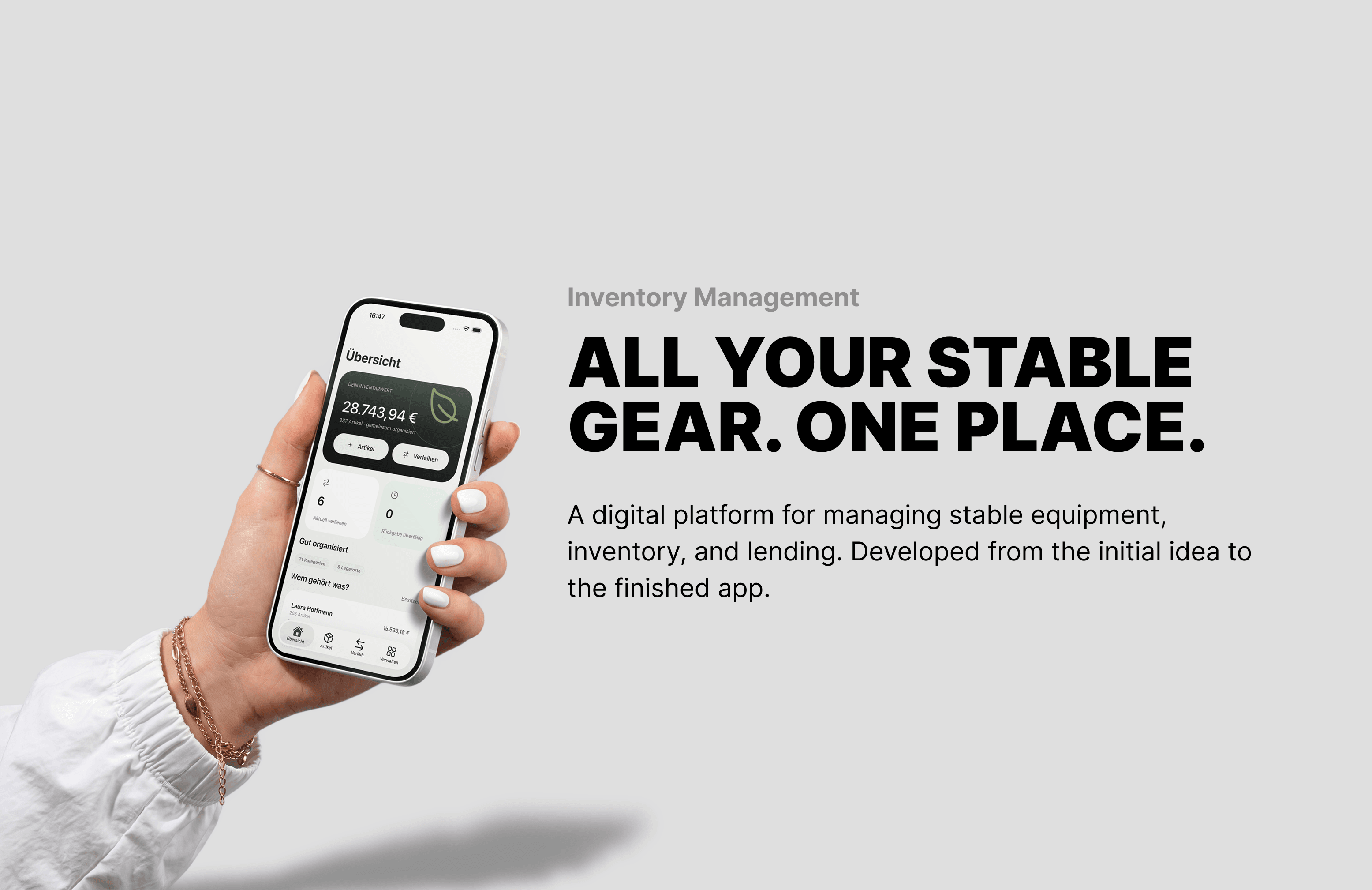
A central dashboard shows how many items have been recorded, their total registered value, and which loans are still outstanding.
What started as a simple list gradually became a small inventory management system built around how people actually organize their equipment.
Why I Built Alurio as a Mobile App
When planning the technical side, I started with a different question:
Where would someone actually use this application?
Probably not sitting at a desk.
More likely at the stable. Standing next to a tack cabinet, inside a trailer, or trying to find a particular piece of equipment.
That's why I didn't want to build traditional management software that just happened to work on a smartphone.
I wanted a proper mobile app.
I chose React Native with Expo, allowing me to build for both iOS and Android using largely the same codebase while still accessing native device features.
Expo Router handles navigation between inventory lists, detail screens, and forms. Additional Expo modules provide functionality such as image handling, haptic feedback, and secure session storage.
For the interface, my priority was making the most important features immediately accessible.
Because when someone is looking for a horse blanket at the stable, the last thing they want is to navigate through five different menus.
Why I Replaced Supabase With My Own API
For data storage and authentication, I initially used Supabase.
It was a practical choice because many essential features were already available. But as development progressed, I wanted more control over how the application processed data and handled business logic.
Alurio doesn't simply store individual records. Items, owners, storage locations, and lending transactions are connected.
I wanted to manage and validate these relationships centrally in the backend.
So I decided to replace Supabase with my own API and a self-hosted PostgreSQL database.
Node.js and Hono for the Backend
The API is built with Node.js, TypeScript, and Hono.
Hono is a lightweight HTTP framework that provides routing, middleware, and error handling without forcing an unnecessarily complex project structure.
The backend processes requests, validates inputs, and enforces the application's business rules.
PostgreSQL and Drizzle for Data Storage
For the database, I use PostgreSQL with Drizzle ORM.
The relational data model fits the connections between items, owners, and lending records. Foreign keys and transactions help maintain data consistency.
Drizzle provides type-safe database queries, while versioned SQL migrations make schema changes reproducible and easier to track.
Building my own architecture means taking on more responsibility. But it also gives me control over how data is processed, validated, and connected.
Keeping the App and Backend on the Same Page
One challenge with separate frontend and backend applications is keeping their data structures consistent.
The frontend might expect certain fields while the backend returns something different. Or a form might accept an input that the API later rejects.
To avoid these problems, I use TypeScript and Zod.
Shared types and validation schemas are used by both the mobile app and the backend.
TypeScript catches many errors during development, while Zod validates actual input data at runtime.
For API communication, I use TanStack Query.
It handles server-state caching, loading states, and pagination for larger lists. When an item changes, the relevant data can be refreshed without rebuilding the same logic for every screen.
Authentication uses custom server-side sessions. Passwords are hashed using scrypt, and the mobile app stores its session information securely with Expo SecureStore.
For deployment, I use Docker Compose. The API and PostgreSQL run as separate services, with a dedicated volume for persistent database storage.
This keeps the infrastructure manageable and makes the environment reproducible.
What Actually Mattered During Development
Many of my previous projects started with specific business requirements.
Alurio was different.
The idea came from an everyday situation I could observe firsthand. There was no extensive requirements document and no existing business process I had to follow.
That gave me the freedom to start with the actual problem.
What information does a horse owner really need? Which tasks could be simplified? And at what point does an additional feature create more work than it saves?
I think these questions are just as important as the technical implementation.
Especially when building your own product, it's easy to get carried away adding features.
Another report. Another setting. Another dashboard.
Eventually, you've built an impressive application but forgotten that the user originally just wanted to find their horse blanket.
For me, the goal wasn't to build as many features as possible. It was to make the right information and relationships easy to understand and manage.
What's Next for Alurio?
Right now, Alurio is primarily a personal project that started with a real problem. But I could imagine making the app available to other horse owners for free in the future.
I already have a few ideas for additional features.
One particularly interesting option is using QR codes.
Each item or storage location could have its own QR code. Users could print these codes and attach them to storage boxes, cabinets, or individual pieces of equipment.
A quick scan with a smartphone could immediately show what's inside a box or where a particular item belongs.
The same approach could make lending and returning equipment much easier.
Other potential features include reminders for upcoming returns, purchase and maintenance histories, and the ability to share inventory lists with other people.
Offline functionality would also be useful, especially since internet connectivity at stables isn't always reliable.
Whether I'll eventually turn Alurio into an official public product is still an open question.
Maybe it'll get its own domain, a proper brand identity, and a place in the App Store and Google Play.
Before taking that step, though, I'd like to find out whether other horse owners face similar problems and would actually use the application.
Because just because I can build an app doesn't necessarily mean the world needs another one.
My Takeaway: The Problem Comes Before the Technology
What started as a simple idea has turned into Alurio, a mobile inventory management application connecting equipment, storage locations, owners, and lending records.
Technically, it's built with React Native, a custom Hono API, and PostgreSQL.
The architecture provides a solid foundation for future features, although there are still things I'd like to improve, such as full offline synchronization for situations with unreliable internet access.
Whether Alurio will eventually be used by a larger community of horse owners remains to be seen.
What I particularly like about this project, though, is how it started.
I didn't set out to build something with React Native. I wasn't looking for an excuse to develop my own API or work with PostgreSQL.
It started with a cluttered tack room and the question of how to organize everything properly.
The requirements came from that problem. And those requirements ultimately shaped the technical decisions.
Because at the end of the day, my partner probably couldn't care less whether the backend runs on Hono or some other framework.
She just wants to know where her equipment is.
And if Alurio helps her find it faster, the application has already achieved its most important goal.
What's Next for Alurio?
Right now, Alurio is primarily a personal project that started with a real problem. But I could imagine making the app available to other horse owners for free in the future.
I already have a few ideas for additional features.
One particularly interesting option is using QR codes. Each item or storage location could have its own QR code. Users could print these codes and attach them to storage boxes or individual pieces of equipment. A quick scan with a smartphone would then show exactly what's stored inside. The same approach could make lending and returning equipment much easier.
Other potential features include reminders for upcoming returns, purchase and maintenance histories, and the ability to share inventory lists with other people. Offline functionality would also be useful, especially since internet connectivity at stables isn't always reliable.
Whether I'll eventually turn Alurio into an official public product is still an open question. Maybe it'll get its own domain, a proper brand identity, and a place in the app stores.
Before taking that step, though, I'd like to find out whether other horse owners face similar problems and would actually use the application.
Because just because I can build an app doesn't necessarily mean the world needs another one.